Asenion ControlGen™
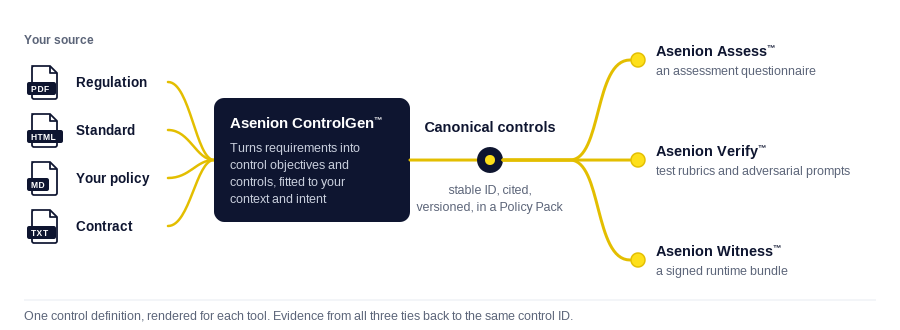
ControlGen turns requirements into controls. Give it a regulation, standard, framework, contract or your own policy, and it produces control objectives and operational controls, fitted to your use case, jurisdiction, risk profile and intent.
Those controls are what the rest of Asenion runs on. Asenion Policy Packs™ hold them, and Asenion Assess™, Asenion Verify™ and Asenion Witness™ apply them across the AI lifecycle.
Why a control, not just a requirement
A requirement says what must be true, for example “high-risk AI must allow effective human oversight.” A control says what will be done to make it true, and how anyone will know.
The same requirement can need different controls in different organizations. Context changes it: the country, the use case, the data involved, the people affected, the level of risk. Intent changes it too: one organization lets its AI only recommend, another lets it act within set limits. ControlGen takes both into account, which is why a generic, AI-written control is not the same as one built for your organization.
What ControlGen produces
Each requirement becomes a canonical control: one master definition with a stable ID.
- Cited. Every control points back to the clause it comes from.
- Versioned. Each change is kept, so you can always show which version of which source a control came from, and what changed.
- Packaged. Controls are grouped into Policy Packs, ready to apply to your use cases.
- Kept current. When a source regulation changes, the change is detected and the affected controls are identified, so updating starts from the change, not from scratch.
One control, three tools
The same canonical control is rendered in the form each tool needs, so the evidence from all three ties back to one control ID.
| Tool | What the control becomes | Used for |
|---|---|---|
| Asenion Assess | Assessment questions | People answer, review and approve, across the lifecycle |
| Asenion Verify | Test rubrics and adversarial prompts | Testing the AI system before deployment |
| Asenion Witness | A signed runtime bundle | Blocking, flagging or allowing agent actions at runtime |
Generate controls in the app
In the app, ControlGen appears as the Asenion Policy Generator.
- Open the Policy Generator and paste in the text of the regulation or policy.
- Review the generated policy structure: its control bundles and controls.
- Edit any control. You can work in JSON or view a single control as YAML.
- Preview it as an assessment, to see the questions people will answer.
- Select Ingest to Platform to add it to your organization, or download the JSON.
Once ingested, the policy can be attached to use cases like any other policy pack.
What ControlGen is not
- It is not legal advice. ControlGen drafts controls from source text. Your people and your counsel review and interpret them.
- It does not replace review. Generated controls are a starting point that your team checks, edits and approves before use.
Related
- What is Asenion? How ControlGen fits with the other four tools.
- Asenion Policy Packs The regulations and standards with ready-made policy packs.
- Glossary Control, control objective, policy pack and other terms.