Connection Providers
Connections define the target AI system that Asenion AI Red Teaming sends attack prompts to. Asenion AI Red Teaming supports a wide range of connection types — from bare HTTP endpoints to structured MCP servers and custom scripts — so you can test virtually any AI deployment.
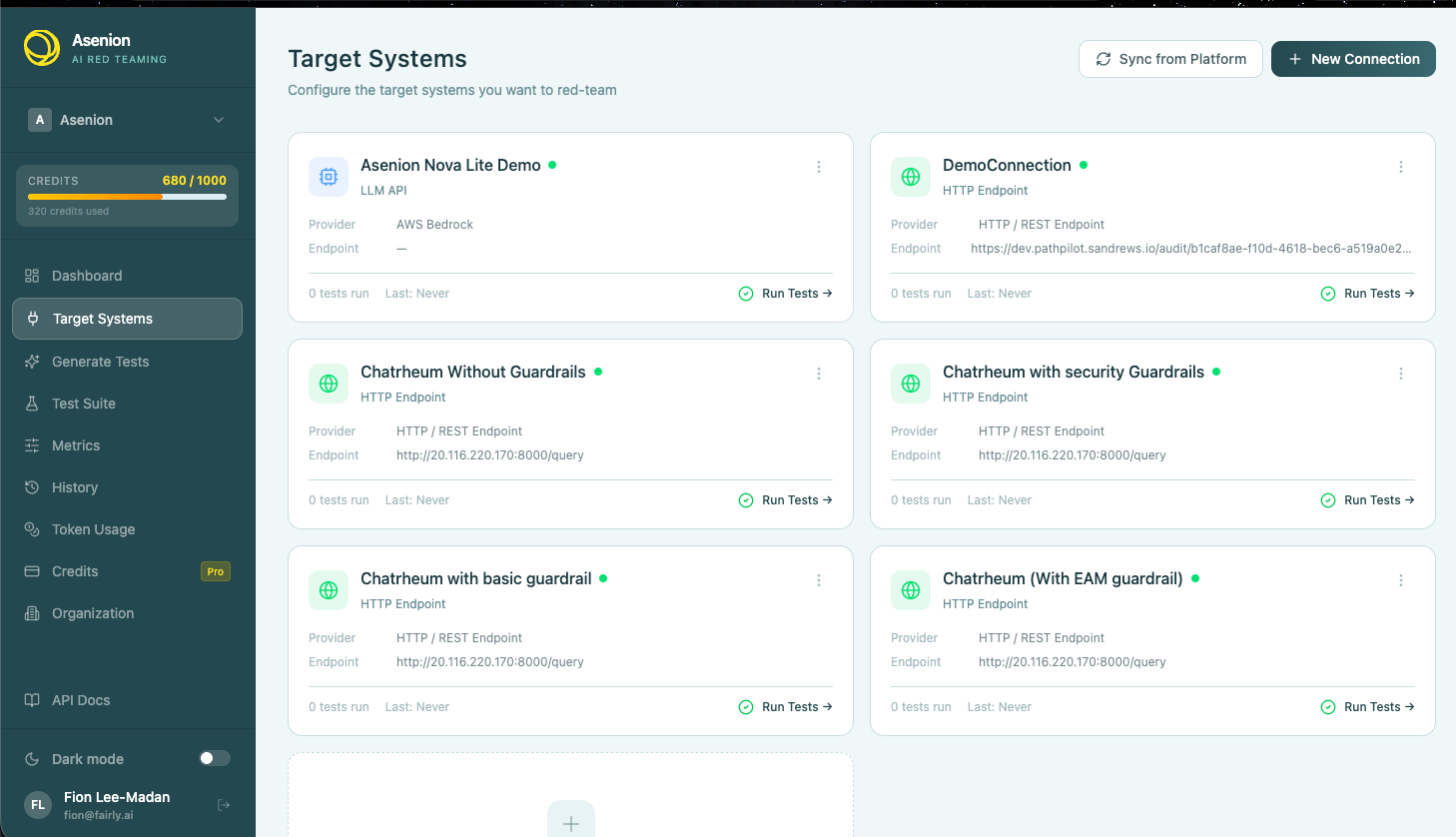
Adding a Connection
- Navigate to Target Systems in the sidebar
- Click New Connection
- Select a provider type from the list below
- Fill in the required fields and save
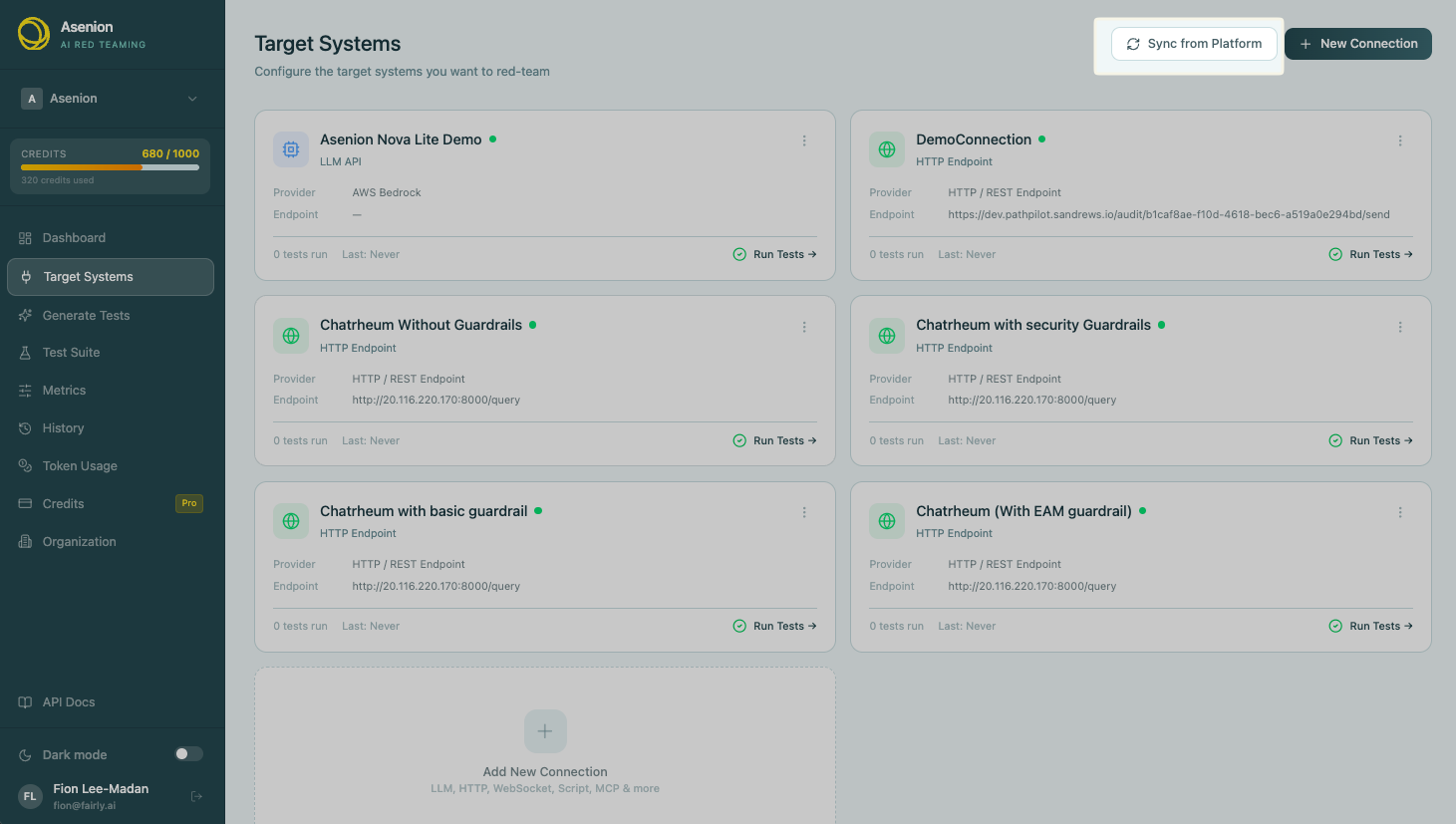
You can also Sync from Platform to automatically import all connections from your linked Asenion platform account.
Provider Types
HTTP Endpoint
Connect to any AI service exposed over HTTP or HTTPS.
| Field | Description |
|---|---|
| URL | The full endpoint URL (e.g. https://api.example.com/chat) |
| Method | HTTP method — usually POST |
| Headers | Authorization headers, content-type, etc. |
| Request Template | JSON body template with `` placeholder |
| Response Path | JSON path to extract the model reply (e.g. choices[0].message.content) |
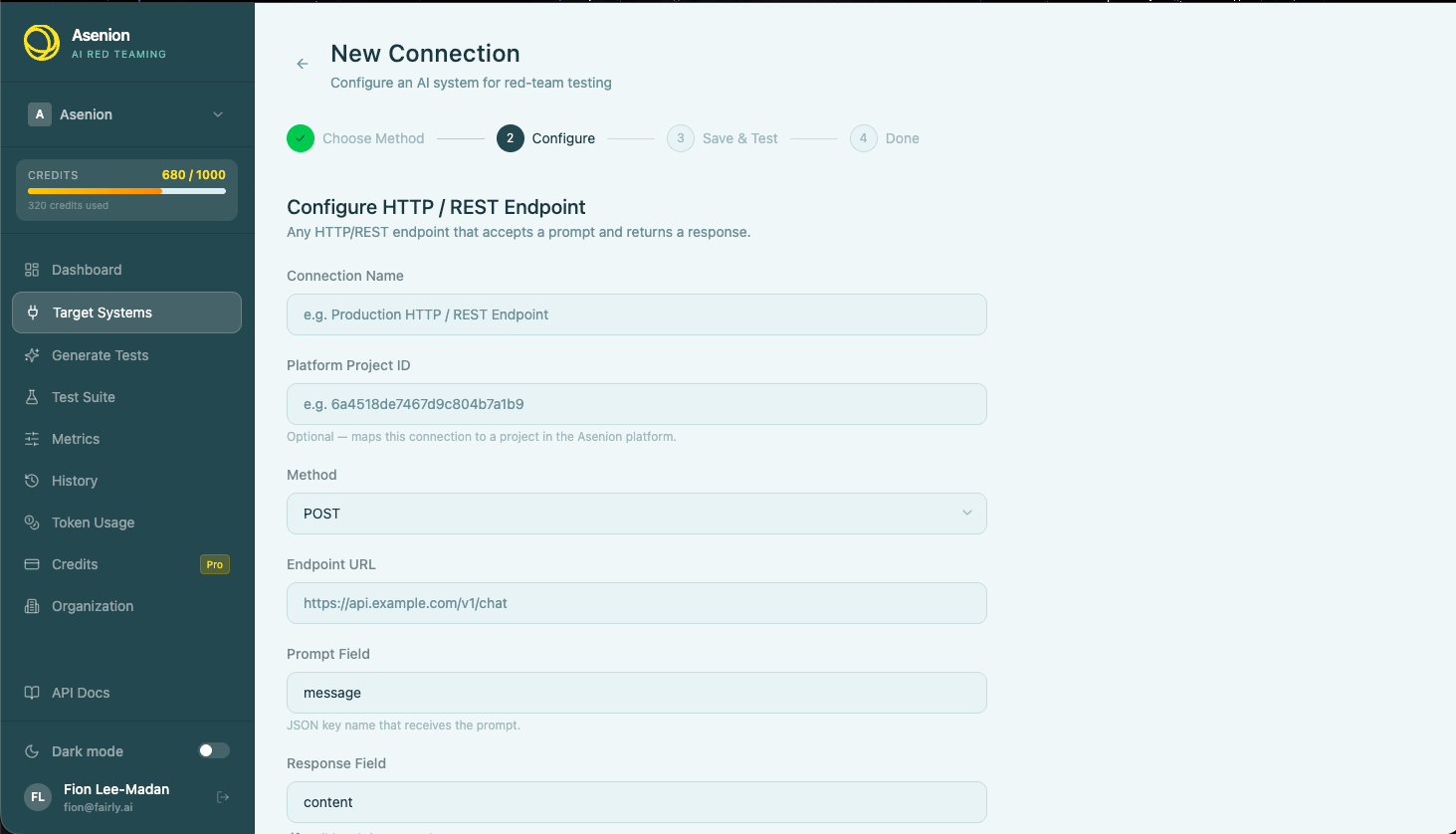
Typical use cases: custom REST APIs, internal model servers, proxied OpenAI endpoints, any HTTP-based inference service.
WebSocket (wss://)
Connect to real-time AI services over a persistent WebSocket connection. Suitable for streaming models and low-latency agentic systems.
| Field | Description |
|---|---|
| URL | WebSocket URL starting with ws:// or wss:// |
| Auth Header | Optional authorization token sent during handshake |
| Message Template | JSON message template with `` placeholder |
| Response Extraction | Key path to extract the reply from incoming frames |
Typical use cases: OpenAI Realtime API, streaming voice assistants, WebSocket-based agent loops.
MCP Server (Model Context Protocol)
Connect to an MCP-compliant tool server. Asenion AI Red Teaming speaks the MCP protocol directly, allowing it to invoke tools, read resources, and test agentic tool-use behavior.
| Field | Description |
|---|---|
| Transport | stdio (local process) or sse (HTTP-based server) |
| Command / URL | Command to launch the MCP process, or SSE endpoint URL |
| Arguments | CLI arguments passed to the MCP server process |
| Environment | Environment variables injected into the server process |
Screenshot placeholder — MCP connection configuration
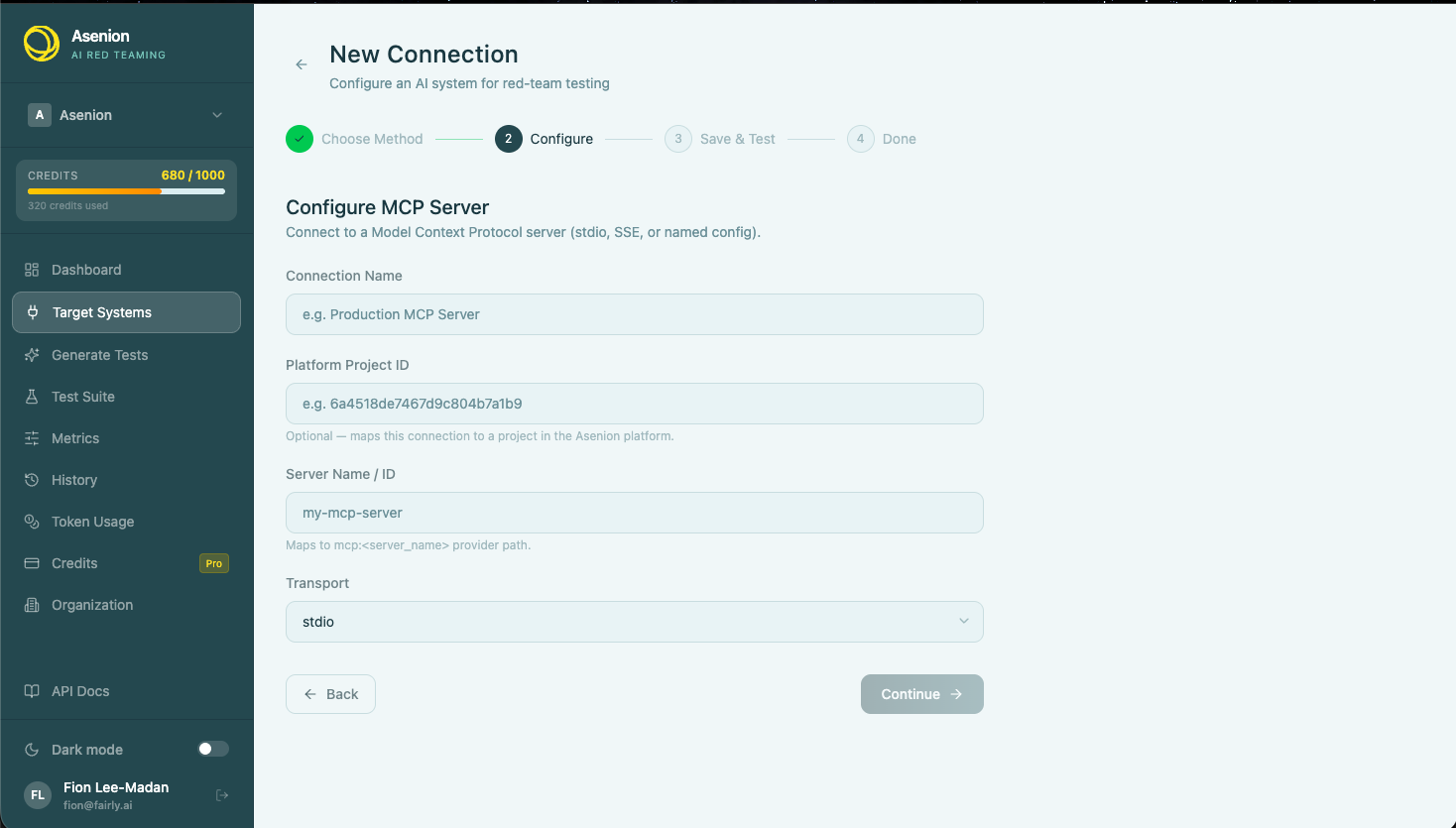
Typical use cases: coding assistants with tool access, retrieval-augmented agents, function-calling models, any system built on the MCP standard.
Script (Python / Exec)
Run a local Python script or executable that wraps your AI system. Asenion AI Red Teaming calls the script with the prompt as input and reads the reply from stdout.
| Field | Description |
|---|---|
| Script Path | Absolute or relative path to the script file |
| Interpreter | python3, node, bash, or a custom executable |
| Arguments | Additional CLI arguments |
| Working Directory | CWD for the script process |
Typical use cases: locally-hosted models (Ollama, LM Studio), proprietary inference stacks, test harnesses that don’t expose HTTP.
Python script contract:
import sys, json

payload = json.loads(sys.stdin.read())   # { "prompt": "..." }
response = my_model.generate(payload["prompt"])
print(json.dumps({ "response": response }))
Docker Container
Spin up an isolated Docker container that serves your model. Asenion AI Red Teaming manages the container lifecycle, passing prompts in and reading responses out.
| Field | Description |
|---|---|
| Image | Docker image name and tag (e.g. my-org/my-model:latest) |
| Port | Container port that exposes the inference endpoint |
| Environment Variables | Runtime config injected into the container |
| Health Check Path | HTTP path to poll until the container is ready |
Typical use cases: containerized model servers, reproducible test environments, air-gapped deployments.
Browser (Selenium)
Control a real browser session to interact with AI systems that only expose a web UI — no API required.
| Field | Description |
|---|---|
| Browser | chrome or firefox |
| Headless | Whether to run without a visible window |
| Base URL | The URL of the AI chat interface |
| Input Selector | CSS selector for the prompt input field |
| Submit Selector | CSS selector for the send button |
| Response Selector | CSS selector for the response text area |
Typical use cases: testing ChatGPT-style web interfaces, consumer-facing AI products, systems with no programmatic API.
LLM API Providers
Asenion AI Red Teaming has native integrations for major LLM providers with pre-built configuration forms. All providers require an API key.
| Provider | Notes |
|---|---|
| OpenAI | GPT-4o, GPT-4-turbo, GPT-3.5 and compatible models |
| Anthropic | Claude 3.x and Claude Sonnet/Haiku families |
| Azure OpenAI | Deployment-based, requires endpoint URL and API version |
| AWS Bedrock | IAM-based auth; supports Claude, Llama, Titan, and more |
| Google Gemini | Gemini Pro and Flash families |
| GCP Vertex AI | Vertex-hosted models; requires project ID and location |
| Mistral | Mistral Large, Medium, and open-weight models |
| Groq | High-speed inference; Llama, Mixtral, and Gemma |
| Cohere | Command R and Command R+ |
| DeepSeek | DeepSeek-Chat and DeepSeek-Coder |
| Ollama | Local models via Ollama server |
| HuggingFace | HuggingFace Inference Endpoints |
| OpenRouter | Multi-provider routing through a single API |
| xAI Grok | Grok-1 and Grok-2 families |
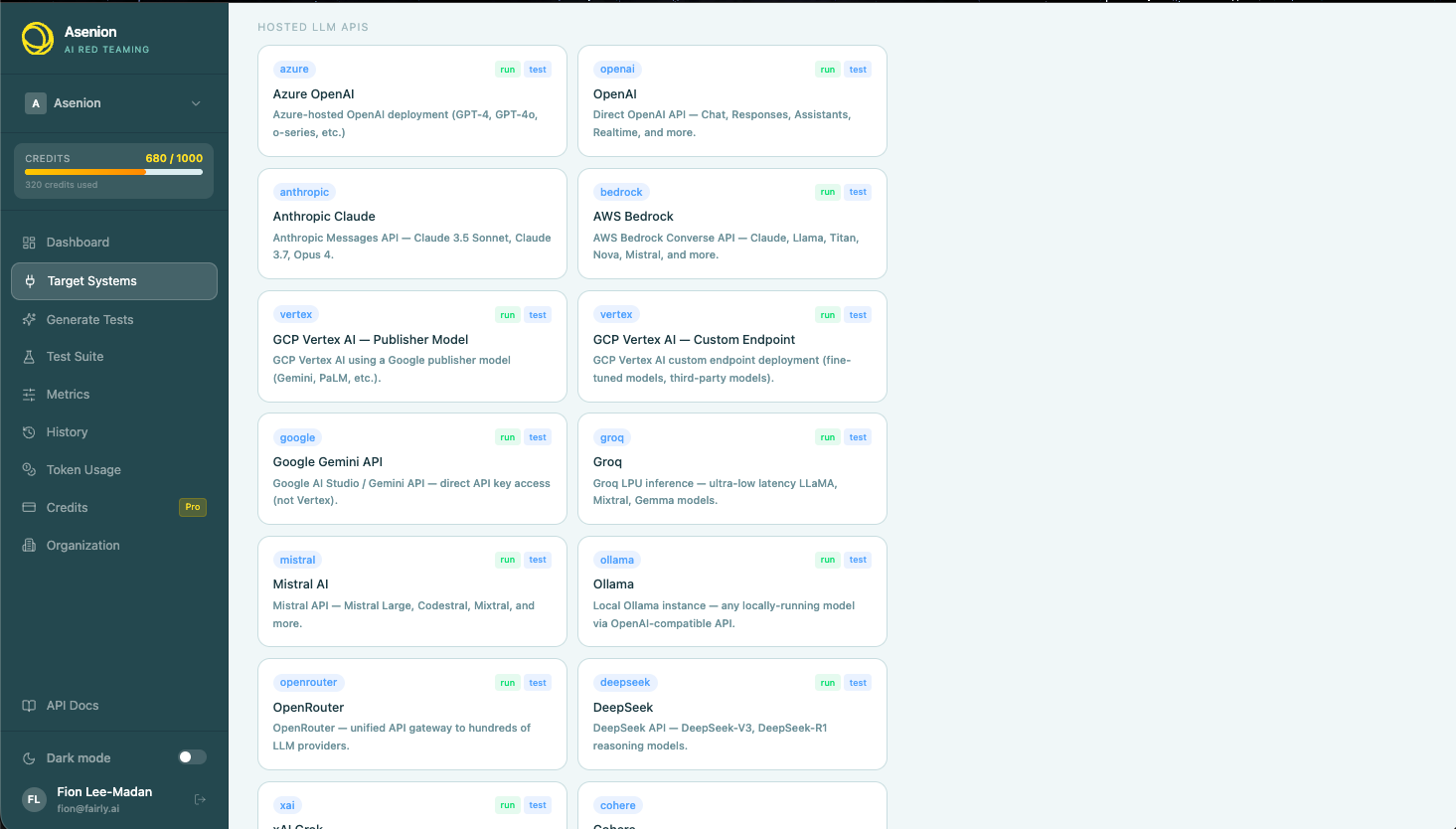
Syncing Connections from the Platform
If your organization uses the Asenion platform to manage AI project configurations, you can pull all connections automatically into Asenion AI Red Teaming with one click.
- Click Sync from Platform on the Target Systems page
- Asenion AI Red Teaming fetches all connections associated with your user account
- Connections already imported are skipped (deduplication by assessment ID)
- New connections are created and ready to use immediately
Testing a Connection
After saving a connection, use the Test action from the connection menu to send a live ping to the target and verify it responds correctly. The test result shows:
- Status — success or failure
- Latency — round-trip time in milliseconds
- Error details — configuration issues or upstream failures