Assessment Workflow
Overview
Assessments in Asenion follow a structured workflow that tracks the status of each policy assessment from initial data entry through review, approval, and independent audit. This creates a reproducible, auditable record of who did what and when.
Assessment Statuses
| Status | Meaning |
|---|---|
| Not Started | Assessment created but no controls answered yet. |
| In Progress | One or more controls have been answered. |
| In Validation | Shown in some lists; not a step in the standard workflow. |
| In Review | Submitted; awaiting the Reviewer. |
| Reviewed | The Reviewer has approved the review. |
| Waiting for Approval | Sent for approval; awaiting the Approver’s decision. |
| Approved | Assessment approved. Contributes to the AI system’s current risk status. |
| Rejected | The Approver rejected it. (If the Reviewer rejects, it goes back to In Progress instead.) |
| Published | Assessment made available as a reference version. |
| Archived | Assessment closed and excluded from active reporting. |
| Cancelled | Assessment cancelled and no longer in progress. |
Workflow Steps
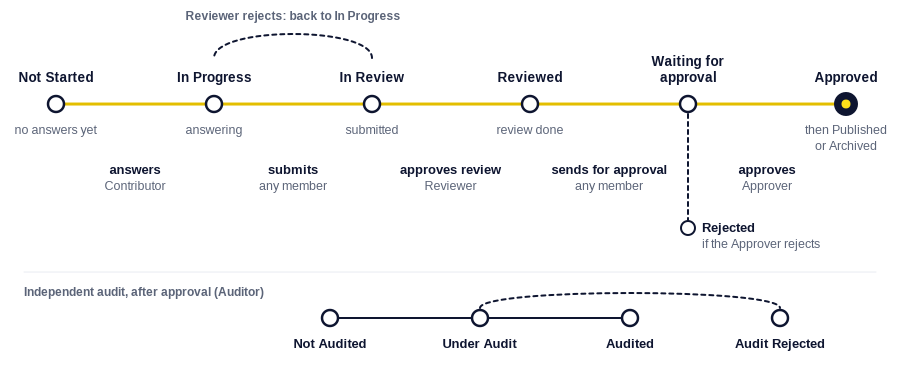
1. Complete controls (Contributor)
A Contributor answers the controls in each control bundle. Progress is shown as a completion percentage per bundle and across the full assessment.
Individual controls can be assigned to specific team members with a due date. Assigned members receive an in-app notification and appear in the task list on the dashboard.
2. Submit for review
When the assessment is ready, any member of the use case can submit it. The status moves to In Review.
3. Review (Reviewer)
A Reviewer inspects the answers, evidence attachments and risk status, and can leave comments on specific controls. Approving the review moves the status to Reviewed. Rejecting it sends the assessment back to In Progress for corrections.
4. Send for approval
Any member can then send the reviewed assessment for approval. The status moves to Waiting for Approval.
5. Approve or reject (Approver)
The Approver makes the final call:
- Approved — the assessment is accepted and the risk status it produces becomes the active record.
- Rejected — the assessment is returned to the submitter with comments. The submitter corrects the answers and resubmits.
6. Independent audit (Auditor)
Separately from the approval workflow, an Auditor can conduct an independent audit against any approved assessment. Audit status is tracked independently and does not affect the review/approval status:
| Audit Status | Meaning |
|---|---|
| Not Audited | Default; no audit has been initiated. |
| Under Audit | Auditor has opened the assessment for review. |
| Audited | Audit complete and accepted. |
| Audit Rejected | Auditor found issues; flagged for follow-up. |
Assignment types
Workflow assignments (who reviews, who approves) can be:
- Per-assessment — set manually when submitting
- Global project role slots — pre-configured at the organization level so routing is automatic (see Global Project Roles)
Next review date
Assessments can have a next review date set. This triggers a reminder notification to the Owner and relevant reviewers when the date approaches.
Related
- User Roles — role definitions for Owner, Contributor, Reviewer, Approver, Auditor
- Alerts & Notifications — notifications triggered by workflow events
- Global Project Roles — org-level review/approval routing